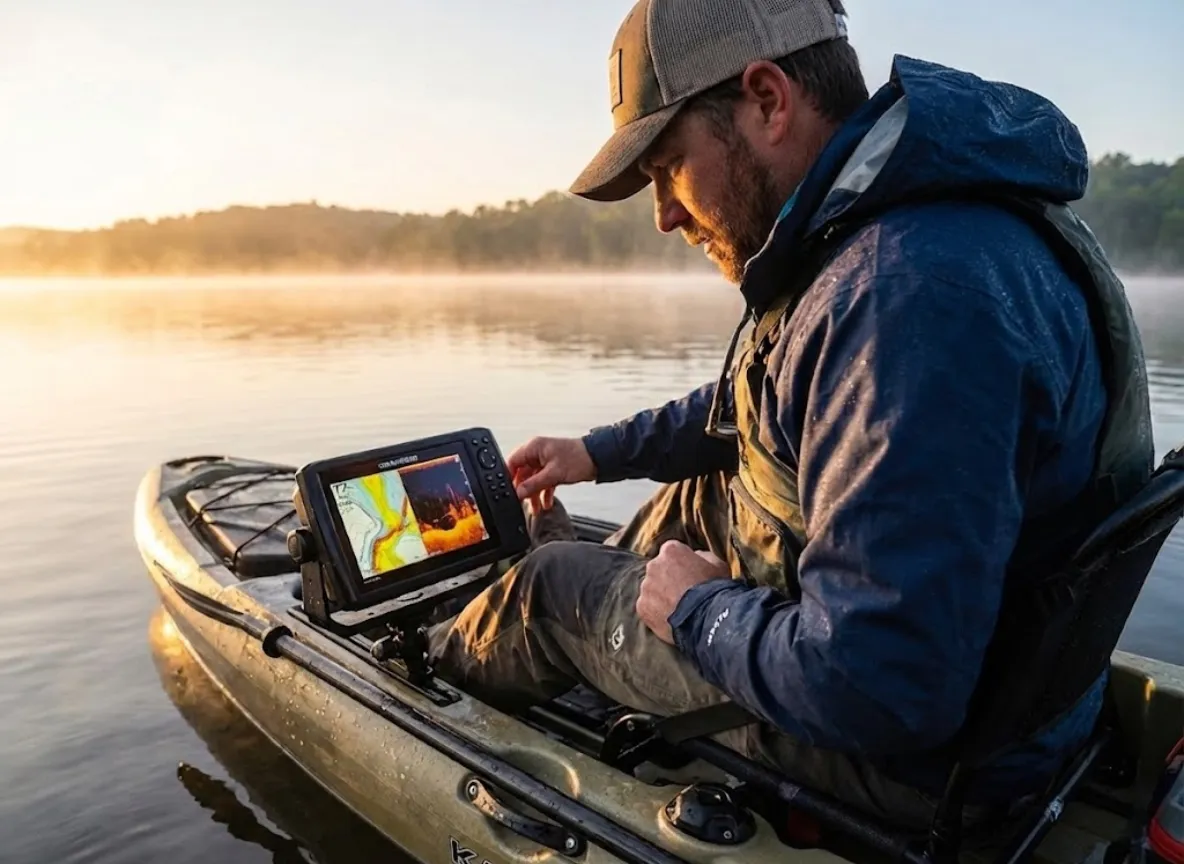
A 12-inch screen is useless if your battery dies at noon. In the tight confines of a kayak cockpit, performance is not defined by peak wattage or marketing buzzwords; it is defined by the immutable laws of hydrodynamics and energy density. The transition to 2026 has brought tournament-grade forward-facing sonar, like Garmin LiveScope Plus and Humminbird Mega Live, to plastic hulls, but it has also introduced a critical vulnerability: the power demands of modern processors often outpace the capacity of traditional rigging.
Buying a unit based solely on a spec sheet creates analysis paralysis. I’ve seen too many kayak anglers drill holes in a pristine hull only to realize their new transducer deployment creates so much drag it feels like paddling with a bucket tied to the stern. This guide bridges the gap between the box store shelf and the water. We are moving past the confusion of acronyms like CHIRP and IPS to focus on engineering confidence—understanding the IPS revolution that makes older screens dangerous for seated fishermen, the lithium mandate that renders lead-acid obsolete, and the strategies for mounting Mega Side Imaging without killing your efficiency.
How to Choose the Right Kayak Electronics
Once you understand how sound travels below the hull, you must ensure you can actually interpret the sonar data displayed above the waterline. This section arms you with the objective physics needed to interpret manufacturer specs through the lens of a holistic angler.
Sonar Frequencies & Beam Dynamics: What You Actually See
The frequency you choose dictates the battle you can fight. For most modern fishing kayaks operating in water under 100 feet, High Wide CHIRP (150-240 kHz) is the gold standard. It provides a wider transducer beam angle than traditional CHIRP sonar, allowing you to track your lure’s descent even if your kayak is drifting slightly off the spot. While high-frequency beams (like 1.2MHz) offer incredible target separation, they behave like a laser pointer—requiring precise boat control that is often difficult in a wind-blown kayak.
Rigging presents its own physics problem. SideScan (or SideVu) requires a longer transducer element to shoot beams sideways. On a small vessel, mounting these long transducers improperly turns them into “water brakes,” significantly increasing drag. Whether you choose a flush scupper mount, a gear track mount, or an arm mount over the side, the physical dimensions matter. You can learn the fundamentals of hydrographic surveying sonar basics from NOAA to understand beam widths, but the practical application comes down to mastering your fish finder on the water, translating those return signals into a decision to cast or paddle on.
Display Technology: The “Nits” and IPS War
A visible screen is the interface, but the hidden engine of your system is the power source that drives it. If you wear best polarized sunglasses for fishing, you likely know the frustration of TN (Twisted Nematic) panels found on older units like the Humminbird Helix 5 G2. These screens often black out completely when viewed through polarized lenses from a seated angle—a safety hazard when checking water depth in a hurry.
For 2026, IPS (In-Plane Switching) panels are mandatory for glare-resistance. They maintain color accuracy and sun glare visibility from extreme angles, which is critical when you are leaning back in a kayak seat. Furthermore, the debate of touchscreen vs keypad is settled by the weather: touchscreens suffer from “phantom touches” when saltwater spray hits the glass. Physical keypads remain superior for wet hand performance in rough water. You can read up on display technology efficiency at Energy.gov, but on the water, brightness (measured in Nits) and polarization compatibility are the only metrics that count.
The Power Dossier: Lithium (LiFePO4) vs. Lead Acid
Physics is cruel to lead-acid batteries. According to Peukert’s Law, as you draw more current from a lead-acid battery (SLA), its usable capacity shrinks dramatically. A modern Garmin Echomap UHD2 93sv might shut off early due to “voltage sag” on an SLA battery even if the battery technically has charge left.
Lithium Iron Phosphate (LiFePO4) is the only viable option for marine electronics today. Brands like Dakota Lithium and Nocqua provide batteries with a flat voltage curve that shed the 4lb weight penalty of lead, which changes the stability profile of your kayak. While UL Standards for Lithium Batteries ensure safety, the practical benefit is getting a full day of runtime. We recommend consulting a power consumption matrix to calculate battery life based on your unit’s amp draw. If you are powering a motor as well, understanding the best trolling motor battery setups will help you consolidate your power system efficiently.
Our Selection Process: How We Built This Guide
We build trust by showing our work. Our commitment to objectivity means we ignore “Max Fuse Ratings” and instead measure “Typical Amp Draw” to ensure your Dakota Lithium 10Ah actually lasts all day. We evaluated products based on “Riggability”—judging connector durability, cable management, and transducer size—just as harshly as sonar clarity.
We analyzed technical schematics, 2026 manufacturing updates like the new twist-lock connectors, and scoured failure reports regarding screen delamination and saltwater corrosion. We looked for IPX7 waterproof rating compliance in real-world conditions, not just lab tests. Finally, a note on affiliate links: We maintain independence. Our recommendations are based on engineering data and field utility, not commission rates.
The Best Fish Finders for Kayaks of 2026: Our Top Recommendations for Every Need
Our Top Picks for The Minimalist / Paddle Angler
Garmin Striker Vivid 4cv
$$$$
The Striker Vivid 4cv is the efficiency king of the kayak world. Drawing a microscopic 0.23A to 0.40A, it allows paddle anglers to utilize ultra-light 7Ah batteries for multi-day expeditions without anxiety. Its greatest asset is the GT20 transducer, which is compact enough to tuck into almost any standard scupper hole, eliminating the hydrodynamic drag that plagues larger units. While the screen is bright and the ClearVü is sharp for structure spotting, the exposed connector pins on the back are its Achilles’ heel; they are prone to corrosion if not aggressively maintained with dielectric grease in saltwater environments.
Power Efficiency
Portability
Screen Visibility
Sonar Detail
Networking
Typical Amp Draw0.23A – 0.40A
Screen Type4.3-inch QSVGA
TransducerGT20-TM (ClearVü/CHIRP)
InterfaceKeypad
You Should Buy This If…
You are a paddle angler who needs to minimize drag.
You want the lightest possible battery setup (7Ah or less).
You fish shallow water and don’t need mapping charts.
You Should Reconsider If…
You fish offshore salt (connector pins are vulnerable).
You need GPS mapping/contours (this is a waypoint-only unit).
Replacing the Hook Reveal, the Eagle 5 brings a massive safety upgrade for seated kayakers: an IPS screen. Unlike previous generations that vanished behind polarized lenses, this display remains readable from sharp angles in direct sunlight. The new twist-lock connector system is a welcome fix, finally eliminating the loose power connections that plagued budget Lowrance units. The SplitShot HD transducer offers excellent DownScan without the bulk of SideScan elements. However, be aware that this is a technological island; it lacks NMEA networking, meaning you cannot share waypoints or connect to a trolling motor network.
Power Efficiency
Durability
Screen Visibility
Sonar Detail
Rigging Ease
Typical Amp Draw0.28A
Screen TypeIPS (In-Plane Switching)
TransducerSplitShot HD (DownScan + CHIRP)
InterfaceKeypad
You Should Buy This If…
You want DownScan imaging without the complexity of SideScan.
You need a screen that is readable in direct sunlight.
You want “Auto-Tuning” sonar that requires no manual adjustment.
You Should Reconsider If…
You need networking or chart plotting capabilities.
You want to spot fish to the left/right of the boat.
For the angler who refuses to drill holes or drag a 12V battery, the **Deeper Chirp+ 2** is the only serious option. It offers legitimate CHIRP sonar with impressive target separation, wirelessly transmitted to your smartphone via its own Wi-Fi signal. Rigging involves nothing more than a flexible arm or a tether, making it the ultimate portable solution for fly-in trips or rental kayaks. The trade-off is your phone’s endurance; the high-data connection drains smartphone batteries aggressively, and viewing a phone screen in bright sun is often far more difficult than reading a dedicated marine display.
Power Efficiency
Portability
Screen Visibility
Sonar Detail
Connection Stability
Battery LifeInternal (Finite cycle)
Screen TypeYour Smartphone
TransducerCastable Sphere
ConnectionWi-Fi
You Should Buy This If…
You absolutely refuse to drill holes in your kayak.
You fish from multiple platforms (kayak, shore, ice).
You want to map water using your phone’s GPS.
You Should Reconsider If…
You fish in heavy waves (connection breaks).
You want a permanent, “always-on” cockpit solution.
Our Top Picks for The Weekend Warrior / Pedal Angler
Lowrance Eagle 7 TripleShot HD
$$$$
The Eagle 7 is the “Goldilocks” unit for 2026, hitting the sweet spot of price, performance, and riggability. The 7-inch IPS screen is generous enough for split-screen viewing without overwhelming a small cockpit, and the TripleShot HD transducer brings SideScan capability to the masses. The redesigned twist-lock connector solves the corrosion anxiety that plagued the old Hook series. However, serious map users should note the lack of touch-to-zoom; navigating charts strictly via keypad buttons can feel clunky and slow compared to the pinch-and-zoom interface we are all used to on our phones.
Power Efficiency
Screen Quality
Sonar Versatility
Durability
Mapping
Typical Amp Draw0.55A – 0.65A
Screen TypeIPS (In-Plane Switching)
TransducerTripleShot HD (Side/Down/CHIRP)
InterfaceKeypad
You Should Buy This If…
You want SideScan to find structure under docks and banks.
You need a rugged connector that withstands splashes.
You want a 7-inch screen without a heavy battery drain.
You Should Reconsider If…
You need touch-screen pinch-to-zoom for maps.
You plan to upgrade to Live/ActiveTarget later (not compatible).
The UHD2 73sv is a powerhouse for anglers who view their kayak as a system, not just a boat. Its standout feature is wireless networking, allowing you to run a dual-screen setup—one for mapping, one for sonar—without running a nightmare of cables through your hull. Quickdraw Contours remains the best-in-class tool for mapping secret ponds. The caveat is the physical footprint of the GT56 transducer; it is remarkably long and heavy, requiring a robust mounting arm like the YakAttack SwitchBlade to prevent it from twisting out of alignment at paddling speeds.
Power Efficiency
Mapping
Networking
Sonar Detail
Ease of Use
Typical Amp Draw1.0A – 1.3A
Screen TypeKeyed-Assist Touchscreen
TransducerGT56UHD-TM
NetworkingWireless Data Sharing
You Should Buy This If…
You want to run two screens (one for map, one for sonar).
You fish unmapped waters and need Quickdraw Contours.
You want a hybrid interface (touch + buttons).
You Should Reconsider If…
You have a very small kayak (GT56 transducer is huge).
You leave the cradle exposed to salt (contacts corrode).
The Element 7 HV is a specialist tool for the visual learner. Its 1.2 MHz HyperVision sonar is incredibly crisp, but the real star is the RealVision 3D mode, which renders bottom contours in a perspective view. This helps beginners instantly visualize drop-offs and ledges without mentally translating 2D charts. The pure keypad interface is bulletproof in wet weather. However, the processor can feel sluggish compared to newer units; map redraws and menu transitions sometimes lag, which can be frustrating when you are trying to make quick decisions while drifting in current.
Power Efficiency
Sonar Clarity
Processing Speed
Interface
Innovation
Typical Amp Draw1.25A (15W)
Screen TypeNon-Touch LCD
TransducerHV-100 (All-in-one)
Frequency1.2 MHz HyperVision
You Should Buy This If…
You struggle to interpret standard 2D/SideScan images.
You want ultra-high frequency detail (1.2 MHz) at a lower price.
Our Top Picks for The Tournament Pro / Motorized Kayak
Garmin ECHOMAP Ultra 2 106sv
$$$$
This is the flagship for the LiveScope generation. The Ultra 2 106sv features a blazing fast processor that handles the heavy data stream of LVS34 live sonar with zero lag, ensuring what you see on screen is happening in real-time. The 10-inch IPS touchscreen is a beautiful canvas for split-screen mapping and sonar. But be warned: this unit generates significant heat and the screen is sensitive. Leaving it in a sealed, hot car or exposing it to extreme thermal cycling can lead to screen delamination—a costly issue that requires you to treat this tool with the care of a laptop, not a tackle box.
Processor Power
LiveScope Integration
Screen Quality
Power Draw
Networking
Typical Amp Draw2.8A (Head Unit Only)
Screen Type10″ IPS Touchscreen
Live SonarSupports LVS34 (Black Box Required)
NetworkingWireless + Ethernet
You Should Buy This If…
You are a tournament angler using LiveScope.
You use a motorized kayak and have battery capacity (30Ah+).
You need wireless networking for a multi-screen setup.
You Should Reconsider If…
You store your kayak in extreme heat (delamination risk).
You are paddling (battery weight penalty is high).
For the structure fisherman hunting logs, rock piles, and laydowns, the Helix 9 remains the undisputed king of detail. Its Mega Side Imaging+ (1.2 MHz) provides forensic-level clarity that competitors still struggle to match. The keypad interface is reliable and precise. However, the Helix is notoriously power-hungry and sensitive to voltage drops. It will simply shut down if your voltage dips, even momentarily. A high-capacity LiFePO4 battery is not optional with this unit; it is a mandatory rigging requirement to keep the screen lit through a long tournament day.
Side Imaging Detail
Interface Reliability
Mapping (LakeMaster)
Power Efficiency
Screen Brightness
Typical Amp Draw2.4A
Screen Type9″ LCD
SonarMega Side Imaging+
Voltage CutoffHigh (~10.8V)
You Should Buy This If…
Your primary goal is finding submerged structure (trees/rocks).
You prefer physical buttons over touchscreens.
You fish lakes with high-definition LakeMaster charts.
You Should Reconsider If…
You use lead-acid batteries (voltage sag will shut it off).
The HDS Pro 9 serves as the nerve center for the ActiveTarget 2 system, offering high-definition live sonar that rivals the best in the industry. For kayakers, the “Pro” designation is crucial because it includes integrated support for HD transducers, reducing the need for external black boxes and simplifying the wiring loom in tight hulls. The SolarMAX HD screen is stunningly bright. The downside is the cost and the sheer drag of the setup; fully rigging this unit with ActiveTarget creates a significant amount of underwater resistance, making it best suited for motorized kayaks rather than paddle craft.
Live Sonar Support
Screen Visibility
Touch Interface
Rigging Simplicity
Power Draw
Typical Amp Draw2.0A
Screen TypeSolarMAX HD IPS
SonarActive Imaging HD (up to 1.2MHz)
NetworkingFull Ethernet
You Should Buy This If…
You are invested in the Lowrance ecosystem (ActiveTarget).
You want the best possible touchscreen interface.
You want high-definition sonar without external “black boxes.”
You Should Reconsider If…
You are on a budget.
You primarily paddle (significant drag from large transducers).
For the offshore angler facing relentless salt spray and crashing waves, the Helix 7 G4 is the benchmark for reliability. Its strictly keypad-driven interface ensures you have 100% control even when the unit—and your hands—are drenched, avoiding the infuriating “phantom touches” that render touchscreens useless in rough seas. It packs Mega Imaging into a compact 7-inch frame. However, its limitation is expandability; the single SD card slot makes data management annoying, and the lack of networking ports means this unit lives and dies alone—it cannot connect to other screens or trolling motors.
The Simrad NSX brings a modern, Android-based user experience to the kayak console, featuring best-in-class C-MAP Discover X charts that are a dream for navigation. The interface is intuitive, feeling more like a high-end tablet than a piece of marine hardware. It integrates beautifully with saltwater ecosystems. But this modernity comes at a price: the touch-only interface requires discipline. In heavy chop or with wet fingers, executing precise commands can be challenging, and the lack of physical zoom buttons can be a liability when you need to react fast in rough water.
Charting
Interface Modernity
Screen Visibility
Wet Weather Usability
Sonar
Screen TypeIPS Touchscreen
OSAndroid-based
ChartsC-MAP Discover X
InterfaceTouch Only
You Should Buy This If…
Your priority is high-level navigation and charting.
You want a user interface that feels like a smartphone.
The difference between a frustrating day on the water and a productive one often comes down to energy management. Power is finite on a small vessel; you must respect the “Typical Amp Draw” of your chosen unit and size your LiFePO4 battery accordingly—10Ah is the new minimum for any modern color screen.
Rigging is performance. A $2,000 unit will fail if the connector pins corrode, so use dielectric grease religiously and consider hydrodynamic arms like the YakAttack SwitchBlade for SideScan to reduce drag. Finally, screen tech matters. Upgrading to IPS is not just about luxury; it is about safety and visibility in open water. Don’t let a dead battery or a corroded pin ruin your trip—invest in the DIY rigging as much as the unit itself.
FAQ – Frequently Asked Questions
What size battery do I need for a kayak fish finder?
You must calculate your unit’s Typical Amp Draw and multiply it by the hours you plan to fish. For a standard 7-inch unit that draws about 1 Amp, a Dakota Lithium 10Ah battery provides a safe buffer for a full day on the water.
Can I mount a SideScan transducer inside the hull?
No, you cannot. SideScan sonar beams shoot sideways and will be blocked by the plastic hull of your kayak. To utilize SideVu, you must mount the transducer externally, either via a scupper mount or an over the side mount.
Why does my fish finder turn off when I paddle fast?
This is typically caused by a loose power connection or voltage drop. Ensure you are using a LiFePO4 battery, which maintains steady voltage, and check that all your connectors are tight and free of corrosion.
How do I protect my fish finder connectors from saltwater corrosion?
Prevention is key. Apply dielectric grease to the female pins of your power cable before every trip. Additionally, using a short sacrificial extension cable can protect the main unit’s port from wear and salt exposure.
Risk Disclaimer: Fishing, boating, and all related outdoor activities involve inherent risks that can lead to injury. The information provided on Master Fishing Mag is for educational and informational purposes only. While we strive for accuracy, the information, techniques, and advice on gear and safety are not a substitute for your own best judgment, local knowledge, and adherence to official regulations. Fishing regulations, including seasons, size limits, and species restrictions, change frequently and vary by location. Always consult the latest official regulations from your local fish and wildlife agency before heading out. Proper handling of hooks, knives, and other sharp equipment is essential for safety. Furthermore, be aware of local fish consumption advisories. By using this website, you agree that you are solely responsible for your own safety and for complying with all applicable laws. Any reliance you place on our content is strictly at your own risk. Master Fishing Mag and its authors will not be held liable for any injury, damage, or loss sustained in connection with the use of the information herein.
Affiliate Disclosure: We are a participant in the Amazon Services LLC Associates Program, an affiliate advertising program designed to provide a means for us to earn advertising fees by advertising and linking to Amazon.com. As an Amazon Associate, we earn from qualifying purchases. We also participate in other affiliate programs and may receive a commission on products purchased through our links, at no extra cost to you. Additional terms are found in the terms of service.